

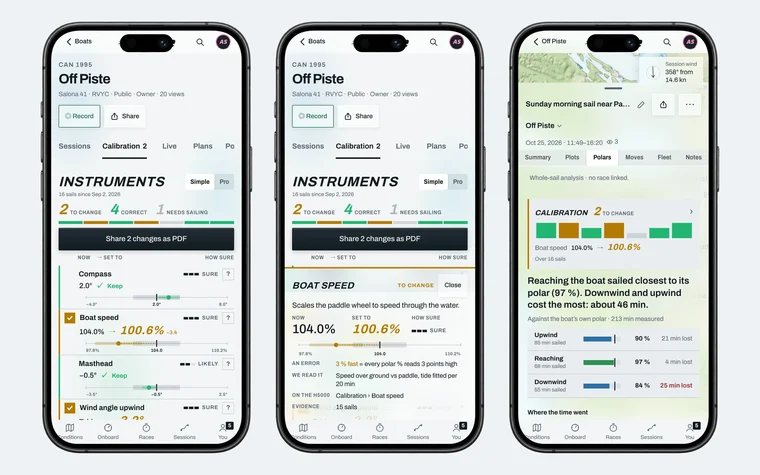

A paddle wheel that reads 3 % fast makes every polar figure read 3 points high. A true wind angle table 3° too wide puts a 6° lift on the new tack, every tack. Telltale reads this from the sails you record and gives one answer per instrument: what is set, what to set it to and how sure it is.
1. Calibration tab
Open your boat and pick Calibration. Its number is the count of sure changes. Instruments are listed in the order to set them: compass and boat speed first, because every wind figure is computed from them.
Each row has three figures. Now is what it is set to. Set to is what the sails say it should be. How sure is a three-bar meter: Sure, Likely or Early.
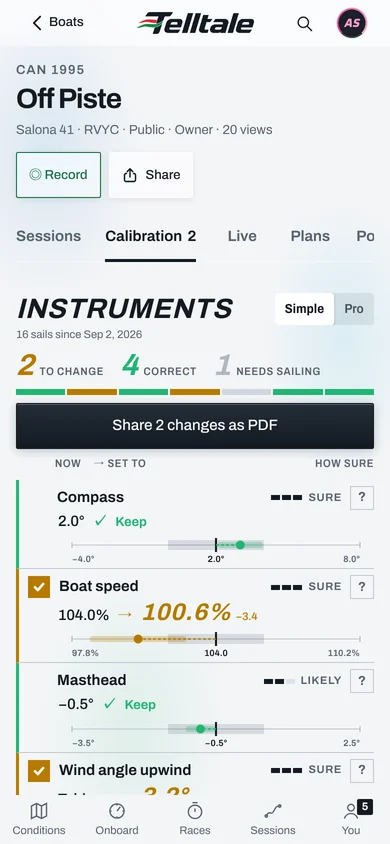
Off Piste's 16 sails since September 2, 2026 give two changes:
- Boat speed reads 3.2 % fast over 15 sails. The setting goes from 104.0 % to 100.6 %.
- Wind angle upwind: the table is 3.2° wide over 6 sails, so the wind lifts after each tack.
Four more are correct: the compass, the masthead unit, the downwind wind speed table and heel. The downwind wind angle table needs more sailing: three sails are not enough yet.
Tick the changes you want and tap Share 2 changes as PDF: one page with each change in the order to make it, where it is on a B&G H5000, what is set now and what to set. Save it to Files or send it to whoever sets the instruments.
2. Instrument settings
Tap the ? on any row for what the setting does, what an error costs, how Telltale reads it and where it is on a B&G H5000.
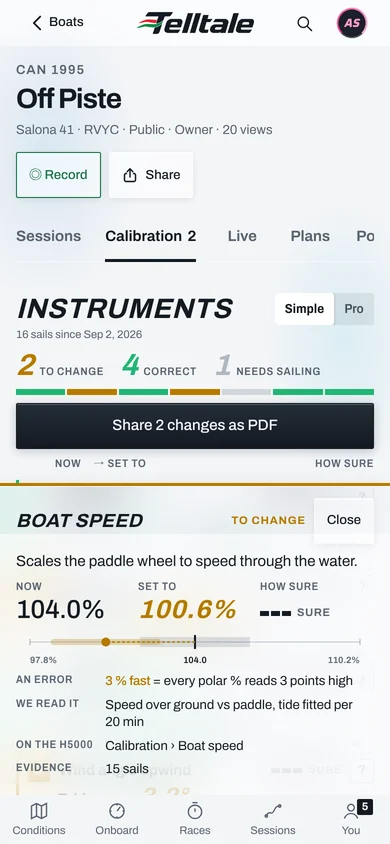
How Telltale reads each one:
| Setting | Read from | An error costs |
|---|---|---|
| Compass | Track over ground against heading, tide removed | 2° off: every wind direction 2° off |
| Boat speed | Speed over ground against the paddle, tide fitted per 20 min | 3 % fast: every polar % 3 points high |
| Masthead unit | Port against starboard wind angle at the same speed | 1° off: the wind direction jumps 2° every tack |
| Wind angle tables | Wind direction before and after each tack or gybe | 3° wide: a 6° shift after every tack |
| Wind speed table | Wind speed either side of each mark | Downwind wind speed reads high off the sails |
| Heel | Heel at rest, at the dock | 1° off: leeway and true wind off on one tack |
Costs are worked at 12 kn true wind, 42° true wind angle and 6.5 kn boat speed.
3. Sure changes
A tool that changes its mind after every sail is worse than none. Telltale pools all the sails since the instrument last changed, tests whether the error is larger than the noise, and checks that both halves of the data agree. Only then is a row To change. A correct setting says Keep. One without enough sailing says what it still needs, such as more tacks in steady wind.
When you change a setting, the pool starts again from that day. Telltale reads a B&G H5000's settings as it records, so it sees the change itself; for other systems, add it in the tab's Pro view.
4. Sails and alerts
The Sessions tab and each sail's Polars tab carry the same band: the count of sure changes and one cell per instrument. Tap it to open the Calibration tab.
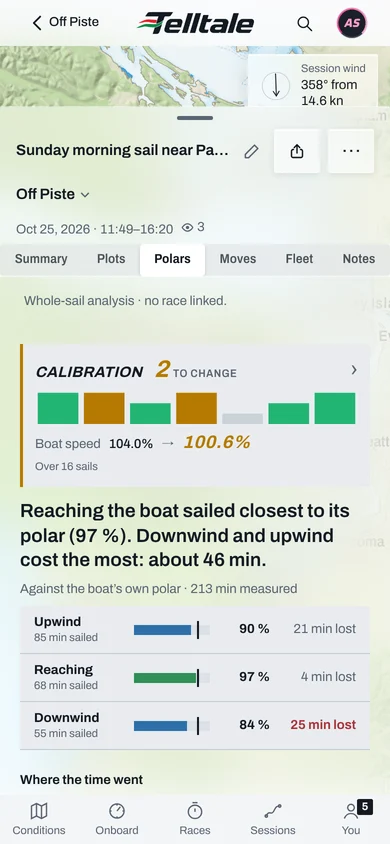
The polar figures there are scored on the corrected readings, so a fast paddle no longer makes a slow day look good. The live page's true wind uses them too.
When a change becomes sure, the bell says so. A push goes out only when the change holds with and without the newest sail, and at most once a month per boat: over Off Piste's 19 sails in 77 days, one push. Turn Calibration findings off in your alert settings to check the tab yourself.
What it needs
- Heading, boat speed and apparent wind, recorded by Telltale from a phone, a laptop aboard or a Gateway.
- A few sails with tacks in steady wind. The wind tables need more tacks and gybes.
- Owner or crew status. Followers do not see calibration.
On a phone recording a B&G H5000, Write to H5000 opens the sure changes for review before writing. Elsewhere, share the PDF and set the changes at the display. Older app builds may need a browser to share the PDF.