

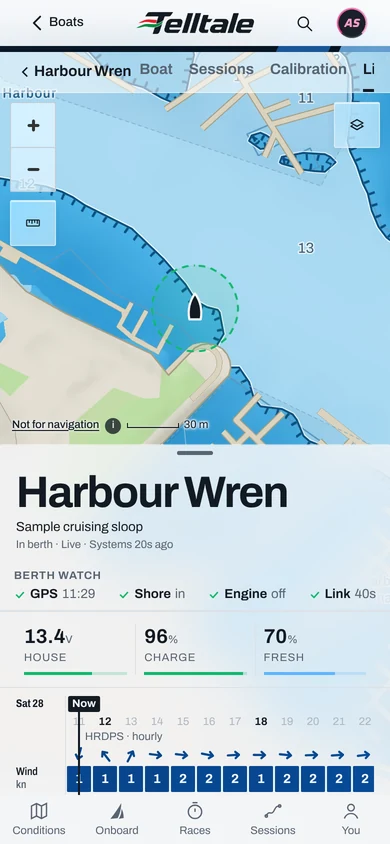

You are at work and the boat is at the dock. Is it still in its berth? Is shore power in? Is the engine off? Telltale's berth watch answers on one row, tells the crew's phones if the boat leaves, and says plainly when it cannot tell.
1. Open Live
Open your boats, pick the boat and choose Live. If the boat is in its berth, or has gone quiet, you get a map and a drawer instead of the sailing view. A recorder left streaming at the dock does not change that while the boat is inside its berth ring.
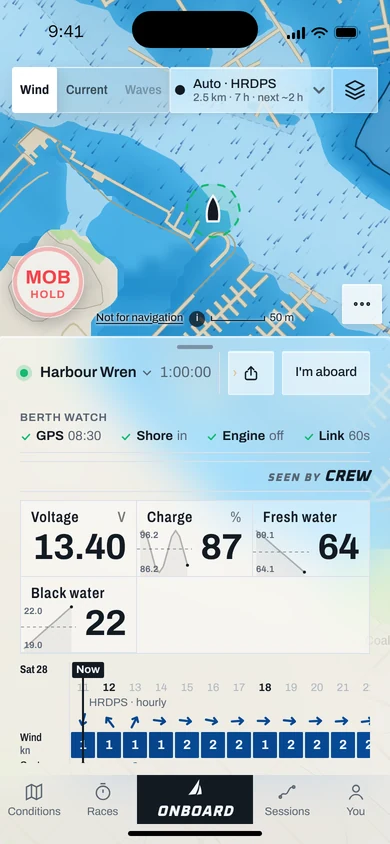
The map shows the boat and the berth ring, a dashed circle around the berth. The ring is never smaller than 25 m in radius, so GPS scatter and a boat swinging on its lines do not count as leaving. Under the boat's name the drawer says In berth and how long ago the boat was heard: Live if it reported in the last minute.
2. Read the four cells
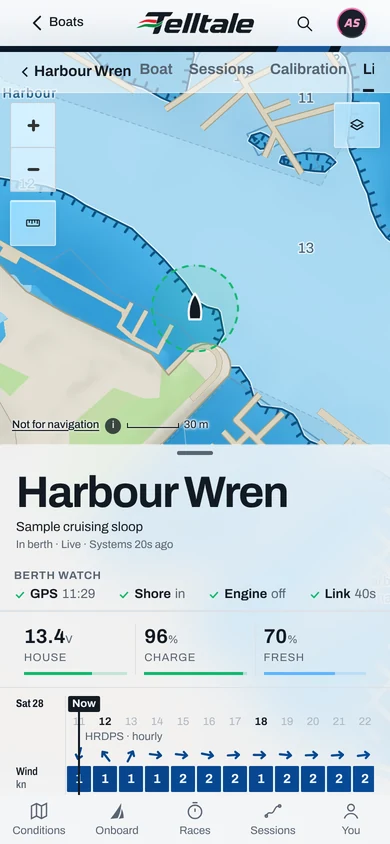
The Berth watch row has one cell per source:
- GPS: the time of the last fix, or the date if it is older than today.
- Shore: in or out, from the shore power the boat reports.
- Engine: off or on.
- Link: how long ago the boat last reported.
A tick means the source is as expected for a boat at its berth. An amber mark means look. A red mark means the evidence says the boat has moved. A cell the boat does not report reads none.
3. The three verdicts
- In berth: nothing contradicts it.
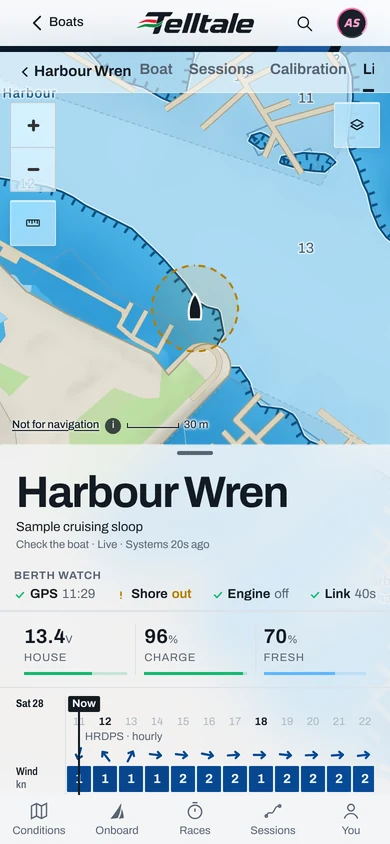
- Check the boat: shore power has gone, the engine is on, or the link has been silent for more than 15 minutes. None of these proves the boat moved, so Telltale does not say it did.
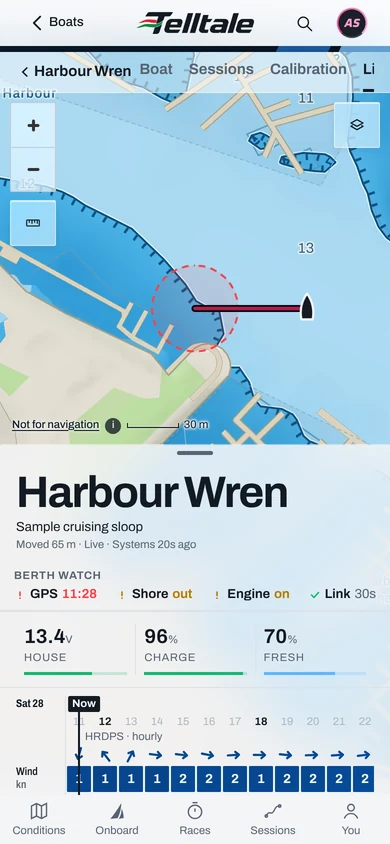
- Moved, with the distance: a GPS fix outside the berth ring. A fix is trusted only once the GPS has been back for 3 minutes, because a receiver that has just woken up takes two to three minutes to settle.
A missing GPS signal is not movement either. The red verdict needs a fix outside the ring.
4. The moved alert
When the verdict turns to Moved, Telltale sends a push alert, Boat moved from berth, to the phones of everyone on the boat's crew list, with the distance. A second one follows when the boat is back inside the ring. Tapping it opens the boat's Systems page.
The alert is on for every boat with nothing to set up. It stays quiet while a crew member's phone is recording a sail for the boat, since the boat has then left with its crew, and while the owner has muted the boat's alerts (the boat's settings, Alerts, More alert settings), for example during a haul-out. Check the boat and a silent link do not push; the boat's silent alert covers a boat that stops reporting.
5. In the phone app
In the Telltale app, open the boat's Onboard tab. With the boat at rest the map shows the berth ring and the hull, and the card under it carries the same Berth watch row, then the boat's speed, heading and satellites where it reports them, who can see the boat, every system the boat reports as its own instrument with the day's trace, and the 30 hour wind at the berth.
6. The rest of the drawer
On the web, below the row, the drawer shows the house battery volts and charge and the fresh water tank from the boat's Systems tab, a 30 hour wind forecast at the berth and the last session, so you can see the wind the boat is sitting in and where it was last sailed.
Telltale sets the berth for you: the first time shore power is connected with the engine off, the boat's last GPS position becomes the berth. This post does not cover moving it by hand.
The berth watch is not an anchor alarm. For that, see the Anchor tab on the boat page.