

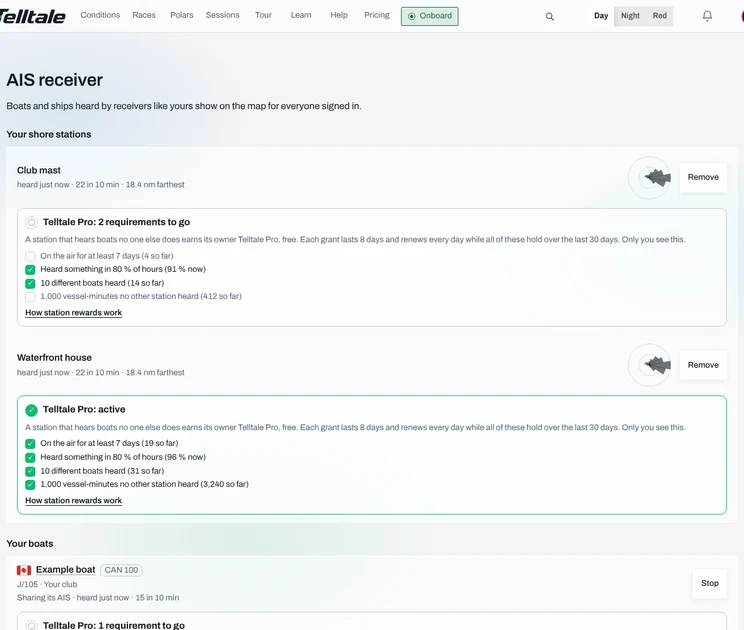

Telltale's race maps show the traffic around the course: the committee boat, the spectator fleet, the freighter crossing the start line. That traffic comes from AIS receivers, and the best ones sit on club masts and waterfront houses where the racing is. So we are building a network of them. Anyone who runs a receiver that adds real coverage gets Telltale Pro for as long as it keeps doing so.
1. Add your receiver
Open /stations/ais and choose Add a shore station. Name it, tap the map where the antenna is and enter its height. Telltale gives the station its own UDP port and a key.
Copy the line for your software and paste it in. For AIS-catcher, ShipFeeder and the others it is a UDP output to ais.telltaleapp.ca on your station's port. For anything that posts over HTTP, it is the station's URL with its key. The key is shown once, so keep it safe.
The station shows heard just now as soon as the first sentences arrive. If your internet address changes, the station picks up the new one after an hour of silence.
2. Share from your boat
If your boat runs the Telltale agent, it is already listed under Your boats. Press Share and what its AIS radio hears goes onto the map. Your own transponder is never shared this way. Shared or not, the AIS your boat hears is kept in a private log only you can see.
3. How a station earns Telltale Pro
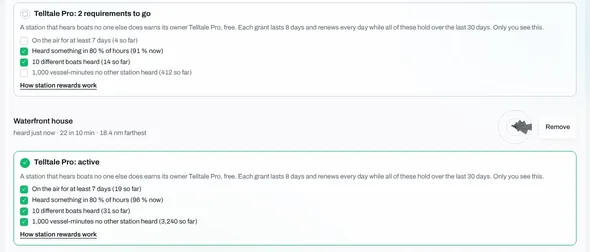
The reward goes to stations that add coverage we wouldn't have otherwise. Every day Telltale looks back over the last 30 days. A station qualifies when:
- it is at least 7 days old
- it heard at least 10 different boats
- it heard boats for at least 1,000 vessel-minutes that no other station heard
- for shore stations, it was heard from in at least 80 % of the hours
A qualifying station gives its owner Telltale Pro for 8 days, and each daily check extends that. If the station goes quiet, Pro runs out about a week later; when it qualifies again, Pro comes back.
The checklist on your station's row shows where it stands. Nobody else sees it.
4. What doesn't count
A shore station only gets credit for boats within 100 nm of its pin, and only for positions that reach us within ten minutes of being heard. A boat counts only when someone else's source has seen the same vessel within six hours and 200 nm. Made-up targets and replayed feeds earn nothing.
5. Where we need receivers
Anywhere people race: club masts, waterfront houses, marina offices, boats that sail most weekends. One receiver high up by a busy race area is worth more than several in a harbour that is already covered. Questions? Ask on the support page.