

What works
See the boat’s systems from shore or record the Cerbo aboard.
VRM brings batteries, solar, shore power, tanks, history and alerts into Telltale. The Cerbo uploads to VRM, and Telltale reads the installation your account can access. There is no Telltale recorder to install aboard for this route. Follow the boat at the dock or on a mooring.
For local readings, a phone, Desktop or Gateway connects to the Cerbo’s Venus OS data on the boat network. Gateway can also run aboard the Cerbo itself as a boat-computer recorder.
| Route | Requirement | Use |
|---|---|---|
| VRM | An accessible VRM installation | Systems monitoring from shore |
| Local Cerbo feed | A recorder on the Cerbo network | Readings while recording aboard |
| Gateway on Cerbo | Gateway installed and linked | A boat-computer recorder |
Connect VRM
Link the boat to its VRM installation in a few steps.
Open the boat, then Settings → Recording → Victron VRM → Connect VRM. You can also start from No recorder aboard? Connect Victron VRM in Systems. Press Open VRM tokens, make a token in VRM and copy it. Paste it into Telltale to find the installations your account can access.
Choose the boat’s installation and press Connect. With only one installation, it is already selected. Use Open Systems → to see the readings. Confirm the installation here if your account can access several boats.
Check the age of the readings
See how recent each systems reading is before acting on it.
Systems shows the source and age of its readings. The Cerbo’s default VRM logging interval is 15 minutes, so a reading can be up to 15 minutes old. To shorten the interval, use Settings → VRM online portal → Log interval on the Cerbo. One minute is the minimum.
Alerts use the latest figures VRM received. Polling VRM again cannot bring forward the Cerbo’s next upload, and a quiet graph may mean the boat has not sent new data. Read the age and last contact together when judging a change in battery charge or shore power.
History and recorder handover
Start with 31 days of history and switch sources automatically.
After the first connection, Telltale brings in the last 31 days from VRM. Systems starts with recent history. The available history follows what VRM holds for the selected installation and what your account is allowed to read.
When a local recorder sends the Cerbo’s readings, those readings take priority and VRM polling pauses. VRM takes over when the recorder goes quiet. Leave VRM connected for the automatic handover.
Read the Cerbo locally
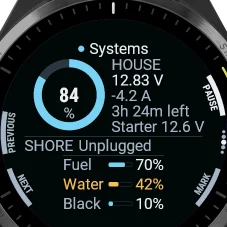
Record battery, charger and shore-power readings on the boat network.
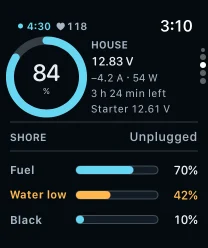
The local Cerbo connection reads batteries, the inverter and charger, and shore power. Use the shared instrument setup on a phone, Desktop or Gateway connected to the Cerbo’s network.
Local tank, temperature and digital-input readings have not all been verified with fitted senders. Compare those readings with the actual installation before relying on them.
Account access and tokens
Replace a token while keeping the boat’s history and alerts.
The VRM account determines which installations and readings Telltale can see. An account with limited access may supply fewer readings even when the boat appears in VRM. Keep the token private: it carries the account’s rights and may have broader powers when used outside Telltale.
Use Replace token when a token expires, is removed or needs changing. The installation, history and alerts stay in place. If access to the installation has been removed, ask its admin to share it again, or use a replacement token from an account with access to the boat.
Troubleshooting
Restore access or uploads without rebuilding the boat’s connection.
If VRM rejects the token, create a new one and use Replace token. If the installation is missing or readings are limited, ask its admin to restore the account’s access.
If the Cerbo stops reaching VRM or a local feed goes silent, check Cerbo power, the boat’s internet, the recorder’s network connection and the local data feed as appropriate. Telltale resumes receiving VRM readings when uploads return. Include the source and last contact when asking for help.
Questions
Do I need a recorder for VRM?
No. The Cerbo uploads to VRM, and Telltale reads the installation through your account without a recorder aboard.
How fresh are the VRM readings?
They can be up to 15 minutes old at the default Cerbo logging interval, which can be shortened to a minimum of one minute. Systems shows the reading age.
Does Telltale change the charger settings?
No. Telltale only reads through both VRM and the local Cerbo connection; it never changes charger settings.
Why does VRM say it is paused?
A local recorder is supplying the Cerbo’s readings, so Telltale has paused VRM polling. VRM resumes automatically when the recorder goes quiet.
Sources and review
Official references checked on 2026-11-23. Product details and schedules change; the provider’s page is the current word.