

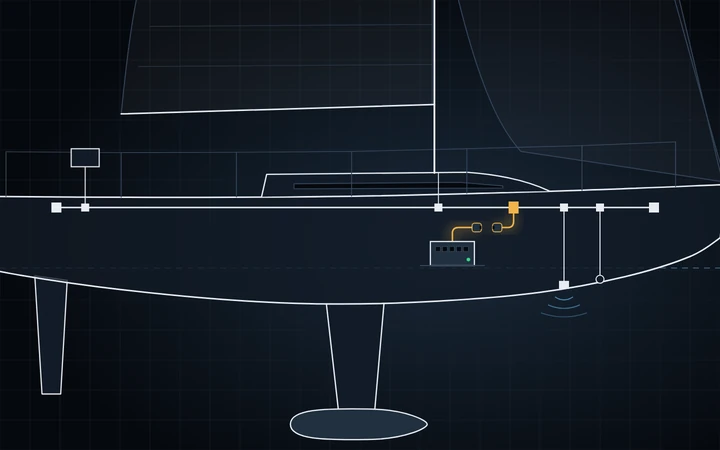

Joining the Cerbo GX to the boat's NMEA 2000 backbone does two things. Your plotter can show the Victron batteries, inverter/charger, solar and tanks, and Telltale Gateway on the Cerbo records every instrument on the bus (wind, boat speed, heading, depth, AIS) with nothing else to set up.
| Part | Note |
|---|---|
| VE.Can to NMEA2000 micro-C male cable | Victron ASS030520200, about 1 m |
| NMEA 2000 micro-C tee | Any make, or a spare drop on an existing multi-port tee |
| Drop cable | Only if the Cerbo is more than 1 m from the backbone. Keep drops under 6 m. |
1. Add a tee
Switch off the NMEA 2000 power. Open the backbone at any joint, fit the tee and close it again. The tee's side port is where the Cerbo's cable connects.

2. Take the fuse out
Near the NMEA 2000 end, a short red wire loops out of Victron's cable. On it is a black, ribbed inline fuse holder, beside a white label that starts "! Important". Victron's photo of the cable shows both.

- Hold the fuse holder by its two ends and pull them apart. If it does not move, twist the ends while you pull.
- If a fuse is inside, take it out and keep it in a safe place. If the holder is empty, leave it empty.
- Push the two halves back together, so that the open contacts are covered.
With the fuse out, only the data wires connect. The Cerbo's VE.Can port needs no power from the network, and the label on the cable says it: "Leave the fuse out if you do not want VE.Can to power the NMEA2000 network." If a VE.Can charger or Lynx is ever added on a 24 V or 48 V boat, a fuse here would put that battery voltage on 12 V instruments.
3. Plug into VE.Can
Plug the cable's RJ45 end into a VE.Can socket on the Cerbo.
| Model | Socket |
|---|---|
| Cerbo GX | Either socket of the pair labelled VE.Can. Do not use BMS-Can: it runs only at 500 kbit/s, and NMEA 2000 runs at 250 kbit/s. |
| Cerbo GX MK2 | VE.Can 1, the isolated port, which Victron recommends for NMEA 2000. |
If a blue VE.Can terminator is fitted in the other socket, remove it. Victron specifies no terminator in any VE.Can port when the Cerbo is on NMEA 2000.
This guide assumes nothing else is chained on that VE.Can port. If a VE.Can MPPT or a Lynx is, follow Victron's Marine Integration Guide instead.
4. Turn on NMEA2000-out
Turn the NMEA 2000 power back on. On the Cerbo's screen, or in Remote Console from VRM, open Settings › Connectivity › VE.Can port. On a Cerbo GX MK2 this is VE.Can port 1; on older Venus OS menus it is under Settings › Services.

| Setting | Value |
|---|---|
| CAN-bus profile | VE.Can (250 kbit/s), the default. Leave it as it is. |
| NMEA2000-out | On |
| Unique identity number selector | 1, unless a second GX device shares the network |
5. Check it
| Where | What you should see |
|---|---|
| Devices, on the same Cerbo page | Your plotter and instruments |
| The plotter's device list | The Cerbo, and one entry per Victron product: each battery monitor, and the inverter/charger's AC in and AC out |
| Telltale | Record two minutes at the dock and open it in Sessions: wind and boat speed are there. This needs Telltale Gateway 1.11.2 or later on the Cerbo. |
What crosses the cable

The Cerbo reads GPS position from the network but never sends it.
Garmin, Navico (B&G, Simrad, Lowrance) and Raymarine Axiom plotters do not display Diesel, LPG, LNG or Hydraulic oil tanks. Set the tank's fluid type to Fuel on the Cerbo, then rename it on the plotter.
Raymarine plotters need each battery on its own instance; Victron's manual gives the steps.
If it doesn't work
| What you see | Why, and what to do |
|---|---|
| Devices is empty | No data reaches the port. Check the tee, and that the backbone has power. |
| Victron data missing on the plotter | NMEA2000-out is off. Turn it on (step 4). |
| Errors on the plotter, devices dropping out | Wrong termination. Power off, measure across CAN-H (white) and CAN-L (blue): 60 Ω is correct. 40 Ω means three terminators, 120 Ω only one. |
| The Cerbo warns of a unique number conflict | Another GX device uses the same block. Pick another number on one of them. |
Sources: Victron Cerbo GX manual (VE.Can interfaces and the NMEA 2000 chapter), the Marine Integration Guide, the cable's page and its photo, with the fuse label. Next: tank sensors on a Cerbo GX.